 没有match的答案?试试对话大模型







| 第1行: | 第1行: | ||
{{wxjsapi-sidebar}}<div class="bread-crumbs">您当前位置: [[wxjsapi|微信小程序JS API]] > [[wxjsapi/guide/key|开发指南]] > 获取地图数据 > POI检索</div><div class="h1-title">POI检索</div><div id="update-time1">更新时间:2019年05月22日</div><div class="bluetitle"><div class="serve-explain-text"><div class="service-page-anchor"><span>简介</span></div></div></div><div class="serve-explain-text">该查找并展示定位地点周边的POI信息,很快知道“我周围有什么”。默认返回生活服务、美食、酒店三种类型的POI。 | {{wxjsapi-sidebar}}<div class="bread-crumbs">您当前位置: [[wxjsapi|微信小程序JS API]] > [[wxjsapi/guide/key|开发指南]] > 获取地图数据 > POI检索</div><div class="h1-title">POI检索</div><div id="update-time1">更新时间:2019年05月22日</div><div class="bluetitle"><div class="serve-explain-text"><div class="service-page-anchor"><span>简介</span></div></div></div><div class="serve-explain-text">该查找并展示定位地点周边的POI信息,很快知道“我周围有什么”。默认返回生活服务、美食、酒店三种类型的POI。 | ||
| − | |||
| − | |||
| − | |||
| − | |||
| − | |||
| − | |||
| − | |||
| − | |||
| − | |||
| − | |||
| − | |||
| − | |||
| − | |||
| − | |||
| − | |||
| − | |||
| − | |||
| − | |||
| − | |||
| − | |||
| − | |||
| − | |||
| − | |||
| − | |||
| − | |||
| − | |||
| − | |||
| − | |||
| − | |||
| − | |||
| − | |||
| − | |||
| − | |||
| − | |||
| − | |||
| − | |||
| − | |||
| − | |||
| − | |||
| − | |||
| − | |||
| − | |||
| − | |||
| − | |||
| − | |||
| − | |||
| − | |||
| − | |||
| − | |||
| − | |||
| − | |||
| − | |||
| − | |||
| − | |||
| − | |||
| − | |||
| − | |||
| − | |||
| − | |||
| − | |||
| − | |||
| − | |||
| − | |||
| − | |||
| − | |||
| − | |||
| − | |||
| − | |||
| − | |||
| − | |||
| − | |||
| − | |||
| − | |||
| − | |||
| − | |||
| − | |||
| − | |||
| − | |||
| − | |||
| − | |||
| − | |||
| − | |||
| − | |||
| − | |||
| − | |||
| − | |||
| − | |||
| − | |||
| − | |||
| − | |||
| − | |||
| − | |||
| − | |||
| − | |||
| − | |||
| − | |||
| − | |||
| − | |||
| − | |||
| − | |||
| − | |||
| − | |||
| − | |||
| − | |||
| − | |||
| − | |||
| − | |||
| − | |||
| − | |||
| − | |||
| − | |||
| − | |||
| − | |||
| − | |||
| − | |||
| − | |||
| − | |||
检索返回的结果包含marker数组数据和完整数据两项。marker数组数据符合小程序marker规范,可以直接用于小程序map中;完整数据包含了百度POI检索接口返回的所有详尽的数据,方便开发者进行自定义开发。 | 检索返回的结果包含marker数组数据和完整数据两项。marker数组数据符合小程序marker规范,可以直接用于小程序map中;完整数据包含了百度POI检索接口返回的所有详尽的数据,方便开发者进行自定义开发。 | ||
| − | + | </div><div class="bluetitle"><div class="serve-explain-text"><div class="service-page-anchor"><span>实现方法</span></div></div></div><div class="devguide"><div class="leftborderbg" style="height:5000px;"></div><div class="devguideorder"><span>1</span><div>打开快速创建的微信小程序 pages/index/index.js 文件,用下面的代码完全替换原代码</div></div><div class="devguidecenter"> | |
| − | + | ||
| − | + | ||
| − | + | ||
| − | + | ||
在以下的代码中,首先引用百度地图微信小程序JavaScript API 模块,然后在页面的onLoad中声明BMapWX对象,最后调用BMapWX.search方法进行POI检索。 | 在以下的代码中,首先引用百度地图微信小程序JavaScript API 模块,然后在页面的onLoad中声明BMapWX对象,最后调用BMapWX.search方法进行POI检索。 | ||
| − | + | <pre class="prettyprint codestyle" style="overflow-y: auto;">// 引用百度地图微信小程序JSAPI模块 | |
| − | + | var bmap = require('../../libs/bmap-wx.js'); | |
| − | < | + | var wxMarkerData = []; |
| − | + | Page({ | |
| − | + | data: { | |
| − | + | markers: [], | |
| − | + | latitude: '', | |
| − | < | + | longitude: '', |
| − | + | placeData: {} | |
| − | + | }, | |
| − | + | makertap: function(e) { | |
| − | + | var that = this; | |
| − | + | var id = e.markerId; | |
| − | + | that.showSearchInfo(wxMarkerData, id); | |
| − | + | that.changeMarkerColor(wxMarkerData, id); | |
| − | + | }, | |
| + | onLoad: function() { | ||
| + | var that = this; | ||
| + | // 新建百度地图对象 | ||
| + | var BMap = new bmap.BMapWX({ | ||
| + | ak: '您的ak' | ||
| + | }); | ||
| + | var fail = function(data) { | ||
| + | console.log(data) | ||
| + | }; | ||
| + | var success = function(data) { | ||
| + | wxMarkerData = data.wxMarkerData; | ||
| + | that.setData({ | ||
| + | markers: wxMarkerData | ||
| + | }); | ||
| + | that.setData({ | ||
| + | latitude: wxMarkerData[0].latitude | ||
| + | }); | ||
| + | that.setData({ | ||
| + | longitude: wxMarkerData[0].longitude | ||
| + | }); | ||
| + | } | ||
| + | // 发起POI检索请求 | ||
| + | BMap.search({ | ||
| + | "query": '酒店', | ||
| + | fail: fail, | ||
| + | success: success, | ||
| + | // 此处需要在相应路径放置图片文件 | ||
| + | iconPath: '../../img/marker_red.png', | ||
| + | // 此处需要在相应路径放置图片文件 | ||
| + | iconTapPath: '../../img/marker_red.png' | ||
| + | }); | ||
| + | }, | ||
| + | showSearchInfo: function(data, i) { | ||
| + | var that = this; | ||
| + | that.setData({ | ||
| + | placeData: { | ||
| + | title: '名称:' + data[i].title + '\n', | ||
| + | address: '地址:' + data[i].address + '\n', | ||
| + | telephone: '电话:' + data[i].telephone | ||
| + | } | ||
| + | }); | ||
| + | }, | ||
| + | changeMarkerColor: function(data, i) { | ||
| + | var that = this; | ||
| + | var markers = []; | ||
| + | for (var j = 0; j < data.length; j++) { | ||
| + | if (j == i) { | ||
| + | // 此处需要在相应路径放置图片文件 | ||
| + | data[j].iconPath = "../../img/marker_yellow.png"; | ||
| + | } else { | ||
| + | // 此处需要在相应路径放置图片文件 | ||
| + | data[j].iconPath = "../../img/marker_red.png"; | ||
| + | } | ||
| + | markers[j](data[j]); | ||
| + | } | ||
| + | that.setData({ | ||
| + | markers: markers | ||
| + | }); | ||
| + | } | ||
| + | }) | ||
| + | </pre> | ||
| + | </div><div class="devguideorder"><span>2</span> | ||
| + | 为能够正常展示地图和检索结果,请打开 pages/index/index.wxml 文件,用下面的代码完全替换原代码 | ||
| + | </div><div class="devguidecenter"><pre class="prettyprint codestyle"><view class="map_container"> | ||
| + | <map class="map" id="map" longitude="{{longitude}}" latitude="{{latitude}}" scale="14" show-location="true" markers="{{markers}}" bindmarkertap="makertap"></map> | ||
| + | </view> | ||
| + | <view class="place_info"> | ||
| + | <text>{{placeData.title}}</text> | ||
| + | <text>{{placeData.address}}</text> | ||
| + | <text>{{placeData.telephone}}</text> | ||
| + | </view> | ||
| + | </pre> | ||
| + | </div><div class="devguideorder"><span>3</span>拷贝样式代码到 pages/index/index.wxss文件</div><div class="devguidecenter"><pre class="prettyprint codestyle">.map_container{ | ||
| + | height: 300px; | ||
| + | width: 100%; | ||
| + | } | ||
| + | |||
| + | .map { | ||
| + | height: 100%; | ||
| + | width: 100%; | ||
| + | } | ||
| + | </pre> | ||
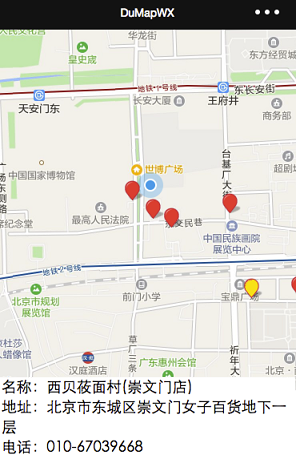
| + | </div><div class="devguideorder"><span>4</span>最后保存修改,即可看到示例效果</div><div class="devguidecenter">本示例在页面加载完成后按照当前定位点,对周边的酒店进行了检索,并将检索的结果通过marker标识到地图中。点击marker可以查看当前POI点的详细信息。 | ||
http://mapopen-pub-jsapi.bj.bcebos.com/img/place.PNG | http://mapopen-pub-jsapi.bj.bcebos.com/img/place.PNG | ||
| − | + | </div></div> | |
| − | + | <!-- | |
| − | + | ||
| − | + | ||
| − | + | ||
| − | + | ||
| + | |||
| + | |||
| + | |||
| + | |||
| + | = POI检索 = | ||
| + | |||
| + | 查找并展示定位地点周边的POI信息,很快知道“我周围有什么”。默认返回生活服务、美食、酒店三种类型的POI。 | ||
| + | |||
| + | 检索返回的结果包含marker数组数据和完整数据两项。marker数组数据符合小程序marker规范,可以直接用于小程序map中;完整数据包含了百度POI检索接口返回的所有详尽的数据,方便开发者进行自定义开发。 | ||
| + | |||
| + | = 实现方法 = | ||
| + | |||
| + | 1、打开快速创建的微信小程序 pages/index/index.js 文件,用下面的代码完全替换原代码。 | ||
| + | |||
| + | 在以下的代码中,首先引用百度地图微信小程序JavaScript API 模块,然后在页面的onLoad中声明BMapWX对象,最后调用BMapWX.search方法进行POI检索。 | ||
| + | |||
| + | |||
| + | <span _fck_mw_customtag="true" _fck_mw_tagname="syntaxhighlight" _fck_mw_tagtype="t" lang="null" _fck_mw_tagattributes="lang" class="fck_mw_syntaxhighlight">fckLRfckLR// 引用百度地图微信小程序JSAPI模块 fckLRvar bmap = require('../../libs/bmap-wx.js'); fckLRvar wxMarkerData = []; fckLRPage({ fckLR data: { fckLR markers: [], fckLR latitude: '', fckLR longitude: '', fckLR placeData: {} fckLR }, fckLR makertap: function(e) { fckLR var that = this; fckLR var id = e.markerId; fckLR that.showSearchInfo(wxMarkerData, id); fckLR that.changeMarkerColor(wxMarkerData, id); fckLR }, fckLR onLoad: function() { fckLR var that = this; fckLR // 新建百度地图对象 fckLR var BMap = new bmap.BMapWX({ fckLR ak: '您的ak' fckLR }); fckLR var fail = function(data) { fckLR console.log(data) fckLR }; fckLR var success = function(data) { fckLR wxMarkerData = data.wxMarkerData; fckLR that.setData({ fckLR markers: wxMarkerData fckLR }); fckLR that.setData({ fckLR latitude: wxMarkerData[0].latitude fckLR }); fckLR that.setData({ fckLR longitude: wxMarkerData[0].longitude fckLR }); fckLR } fckLR // 发起POI检索请求 fckLR BMap.search({ fckLR "query": '酒店', fckLR fail: fail, fckLR success: success, fckLR // 此处需要在相应路径放置图片文件 fckLR iconPath: '../../img/marker_red.png', fckLR // 此处需要在相应路径放置图片文件 fckLR iconTapPath: '../../img/marker_red.png' fckLR }); fckLR }, fckLR showSearchInfo: function(data, i) { fckLR var that = this; fckLR that.setData({ fckLR placeData: { fckLR title: '名称:' + data[i].title + '\n', fckLR address: '地址:' + data[i].address + '\n', fckLR telephone: '电话:' + data[i].telephone fckLR } fckLR }); fckLR }, fckLR changeMarkerColor: function(data, i) { fckLR var that = this; fckLR var markers = []; fckLR for (var j = 0; j < data.length; j++) { fckLR if (j == i) { fckLR // 此处需要在相应路径放置图片文件 fckLR data[j].iconPath = "../../img/marker_yellow.png"; fckLR } else { fckLR // 此处需要在相应路径放置图片文件 fckLR data[j].iconPath = "../../img/marker_red.png"; fckLR } fckLR markers[j](data[j]); fckLR } fckLR that.setData({ fckLR markers: markers fckLR }); fckLR } fckLR}) fckLRfckLR fckLR</span> | ||
| + | |||
| + | 2、为能够正常展示地图和检索结果,请打开 pages/index/index.wxml 文件,用下面的代码完全替换原代码。 | ||
| + | |||
| + | |||
| + | <span _fck_mw_customtag="true" _fck_mw_tagname="syntaxhighlight" _fck_mw_tagtype="t" lang="null" _fck_mw_tagattributes="lang" class="fck_mw_syntaxhighlight">fckLRfckLR<view class="map_container"> fckLR <map class="map" id="map" longitude="{{longitude}}" latitude="{{latitude}}" scale="14" show-location="true" markers="{{markers}}" bindmarkertap="makertap"></map> fckLR</view> fckLR<view class="place_info"> fckLR <text>{{placeData.title}}</text> fckLR <text>{{placeData.address}}</text> fckLR <text>{{placeData.telephone}}</text> fckLR</view> fckLR fckLR</span> | ||
| + | |||
| + | 3、拷贝样式代码到 pages/index/index.wxss文件。 | ||
| + | |||
| + | |||
| + | <span _fck_mw_customtag="true" _fck_mw_tagname="syntaxhighlight" _fck_mw_tagtype="t" lang="null" _fck_mw_tagattributes="lang" class="fck_mw_syntaxhighlight">fckLRfckLR.map_container{ fckLR height: 300px; fckLR width: 100%; fckLR} fckLRfckLR.map { fckLR height: 100%; fckLR width: 100%; fckLR} fckLR fckLR</span> | ||
| + | |||
| + | 4、最后保存修改,即可看到示例效果。本示例在页面加载完成后按照当前定位点,对周边的酒店进行了检索,并将检索的结果通过marker标识到地图中。点击marker可以查看当前POI点的详细信息。 | ||
| + | |||
| + | http://mapopen-pub-jsapi.bj.bcebos.com/img/place.PNG | ||
| + | |||
| + | |||
| + | |||
| + | |||
| + | |||
| + | --> | ||
2023年10月8日 (日) 17:41的版本
POI检索
更新时间:2019年05月22日
简介
该查找并展示定位地点周边的POI信息,很快知道“我周围有什么”。默认返回生活服务、美食、酒店三种类型的POI。
检索返回的结果包含marker数组数据和完整数据两项。marker数组数据符合小程序marker规范,可以直接用于小程序map中;完整数据包含了百度POI检索接口返回的所有详尽的数据,方便开发者进行自定义开发。
实现方法
1
打开快速创建的微信小程序 pages/index/index.js 文件,用下面的代码完全替换原代码
在以下的代码中,首先引用百度地图微信小程序JavaScript API 模块,然后在页面的onLoad中声明BMapWX对象,最后调用BMapWX.search方法进行POI检索。
// 引用百度地图微信小程序JSAPI模块
  var bmap = require('../../libs/bmap-wx.js');
  var wxMarkerData = [];
  Page({
      data: {
          markers: [],
          latitude: '',
          longitude: '',
          placeData: {}
      },
      makertap: function(e) {
          var that = this;
          var id = e.markerId;
          that.showSearchInfo(wxMarkerData, id);
          that.changeMarkerColor(wxMarkerData, id);
      },
      onLoad: function() {
          var that = this;
          // 新建百度地图对象
          var BMap = new bmap.BMapWX({
              ak: '您的ak'
          });
          var fail = function(data) {
              console.log(data)
          };
          var success = function(data) {
              wxMarkerData = data.wxMarkerData;
              that.setData({
                  markers: wxMarkerData
              });
              that.setData({
                  latitude: wxMarkerData[0].latitude
              });
              that.setData({
                  longitude: wxMarkerData[0].longitude
              });
          }
         // 发起POI检索请求
          BMap.search({
              "query": '酒店',
              fail: fail,
              success: success,
              // 此处需要在相应路径放置图片文件
              iconPath: '../../img/marker_red.png',
              // 此处需要在相应路径放置图片文件
              iconTapPath: '../../img/marker_red.png'
          });
      },
      showSearchInfo: function(data, i) {
          var that = this;
          that.setData({
              placeData: {
                  title: '名称:' + data[i].title + '\n',
                  address: '地址:' + data[i].address + '\n',
                  telephone: '电话:' + data[i].telephone
              }
          });
      },
      changeMarkerColor: function(data, i) {
          var that = this;
          var markers = [];
          for (var j = 0; j < data.length; j++) {
              if (j == i) {
                  // 此处需要在相应路径放置图片文件
                  data[j].iconPath = "../../img/marker_yellow.png";
              } else {
                  // 此处需要在相应路径放置图片文件
                  data[j].iconPath = "../../img/marker_red.png";
              }
              markers[j](data[j]);
          }
          that.setData({
              markers: markers
          });
      }
  })
2
为能够正常展示地图和检索结果,请打开 pages/index/index.wxml 文件,用下面的代码完全替换原代码
<view class="map_container">
    <map class="map" id="map" longitude="{{longitude}}" latitude="{{latitude}}" scale="14" show-location="true" markers="{{markers}}" bindmarkertap="makertap"></map>
  </view>
  <view class="place_info">
    <text>{{placeData.title}}</text>
    <text>{{placeData.address}}</text>
    <text>{{placeData.telephone}}</text>
  </view>
3拷贝样式代码到 pages/index/index.wxss文件
.map_container{
      height: 300px;
      width: 100%;
  }

  .map {
      height: 100%;
      width: 100%;
  }
4最后保存修改,即可看到示例效果
本示例在页面加载完成后按照当前定位点,对周边的酒店进行了检索,并将检索的结果通过marker标识到地图中。点击marker可以查看当前POI点的详细信息。