 没有match的答案?试试对话大模型







AR探索
Android AR识别SDK可以结合地图SDK检索功能实现周边探索,开发者调用此功能前需要一起下载地图SDK检索功能,并根据要求进行集成配置,然后调用SDK检索功能,等待返回相关数据后,用Android AR识别SDK进行展示。集成地图SDK检索功能方法请参见检索相关文档;以下重点展示请求数据和返回数据调用Android AR识别SDK的方法。
示例代码如下:
// 调用检索SDK方法,获取检索数据
searchNearbyProcess();
// 实现检索数据监听OnGetPoiSearchResultListener,终点

@Override
public void onGetPoiResult(PoiResult result) {

    if (result.error == SearchResult.ERRORNO.NO_ERROR) {
        poiInfos = new ArrayList<PoiInfoImpl>();
// 对检索返回数据进行包装,并掉转到展示Activity
        for (PoiInfo poi : result.getAllPoi()) {
            ArPoiInfo poiInfo = new ArPoiInfo();
            ArLatLng arLatLng = new ArLatLng(poi.location.latitude, poi.location.longitude);
            poiInfo.name = poi.name;
            poiInfo.location = arLatLng;
            PoiInfoImpl poiImpl = new PoiInfoImpl();
            poiImpl.setPoiInfo(poiInfo);
            poiInfos.add(poiImpl);
        }
        Toast.makeText(this, "查询到: " + poiInfos.size() + " ,个POI点", Toast.LENGTH_SHORT).show();
        Intent intent = new Intent(MainActivity.this, ArActivity.class);
        MainActivity.this.startActivity(intent);
        return;
    }
    if (result.error == SearchResult.ERRORNO.AMBIGUOUS_KEYWORD) {

        // 当输入关键字在本市没有找到,但在其他城市找到时,返回包含该关键字信息的城市列表
        String strInfo = "在";
        for (CityInfo cityInfo : result.getSuggestCityList()) {
            strInfo += cityInfo.city;
            strInfo += ",";
        }
        strInfo += "找到结果";
        Toast.makeText(this, strInfo, Toast.LENGTH_LONG)
                .show();
    }
}
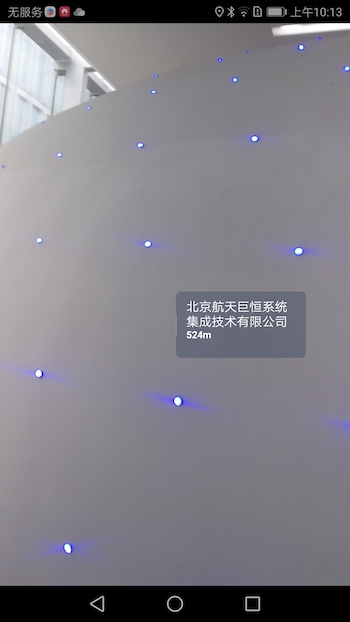
效果展示如下: